If you’re planning to stay connected digitally, understanding how to get an eSIM in Uganda is essential. Both MTN Uganda and Airtel Uganda now support eSIM technology, offering users more flexibility and convenience. This guide explains each step, from checking device compatibility to successful activation, so you can make an informed choice.
What Is an eSIM and Why It’s Useful
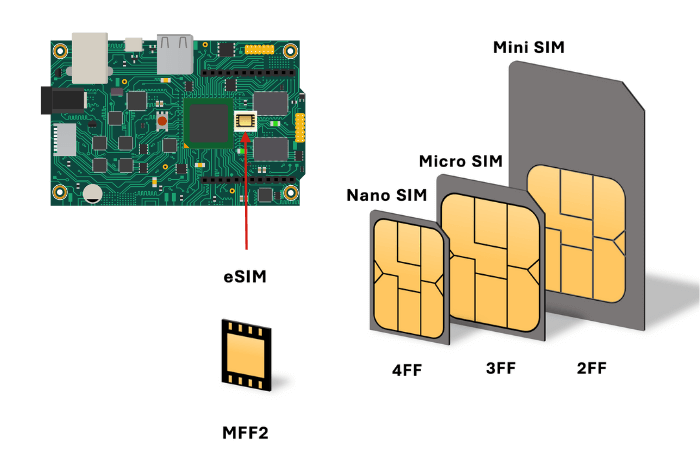
An eSIM (embedded SIM) is a built-in, programmable version of the standard SIM card. Instead of inserting a physical SIM, you activate your mobile line using a QR code. Not only does this simplify the process, but it also allows you to use a physical SIM and an eSIM simultaneously, which is ideal for professionals, frequent travelers, or people who want to separate personal and work numbers.
Check If Your Device Supports an eSIM
Before you get an eSIM in Uganda, verify your smartphone compatibility:
- Open your phone’s Settings → About Phone → eSIM settings.
- Alternatively, dial
*#06#and check for an EID number. - If EID appears, your device supports eSIM.
Common compatible devices include:
- iPhone XS and newer
- Samsung Galaxy S20 series and above
- Google Pixel 3 and newer
- Huawei P40 series (except lite models)
Choose Between MTN and Airtel Uganda
When switching to a digital SIM, you can choose between two providers:
MTN Uganda eSIM Activation Steps
To get started with MTN Uganda, follow these steps:
- Visit any MTN Service Center.
- Carry your National ID or passport.
- Undergo biometric registration as required by law.
- Receive a QR code from the staff.
- Scan it using your phone’s Mobile Data → Add Data Plan option.
- Set MTN eSIM as your primary or secondary line.
Once activated, you can use calls, SMS, data, and MTN Mobile Money as usual.
Airtel Uganda eSIM Activation Steps
For Airtel Uganda, use this process:
- Go to any Airtel Service Center.
- Present a valid ID or passport.
- Complete the required biometric verification.
- Receive your unique QR code.
- Open phone settings and scan the QR code to activate.
- Choose Airtel eSIM as your preferred data or call line.
Once set up, you gain access to calls, texts, mobile data, and Airtel Money features.
Install and Use the eSIM Profile
After you receive the QR code from MTN or Airtel, complete activation using these steps:
- Connect to a stable Wi‑Fi network.
- Open Settings → Mobile Data → Add Data Plan.
- Use your phone to scan the QR code.
- Name your eSIM line (e.g. “Airtel Uganda”).
- Enable data roaming on your eSIM.
- Set as your default line for data or calls, depending on your usage.
You can now enjoy full network access without needing a physical SIM.
Using and Managing Your Uganda eSIM
Once your eSIM is active:
- Use dual SIM mode for flexibility between physical and digital lines.
- Disable roaming on your physical SIM to prevent extra charges.
- Top up with MTN Mobile Money or Airtel Money apps.
- Monitor usage via official mobile apps or USSD codes.
- Keep using your eSIM regularly to avoid automatic deactivation.
MTN Uganda vs Airtel Uganda: Side-by-Side Comparison
| Feature | MTN Uganda | Airtel Uganda |
|---|---|---|
| eSIM Availability | Yes | Yes |
| Activation Method | In-store with biometric ID | In-store with biometric ID |
| Services Offered | Calls, SMS, Data, MoMo | Calls, SMS, Data, Airtel Money |
| Network Coverage | Strong 4G/5G nationwide | Excellent 4G in urban areas |
| Setup Process | QR code scan | QR code scan |
Your choice may depend on network strength in your area, your preferred data bundles, or service center availability.
Important Tips to Remember
Before you get an eSIM in Uganda, consider the following:
- Ensure your phone is unlocked.
- Register with your real ID—fake documents will lead to disconnection.
- Save or print your QR code for future device reinstallation.
- Use the eSIM periodically to maintain active registration.
Final Thoughts
To get an eSIM in Uganda, simply visit an MTN or Airtel service center, register your ID, and activate your line with a QR code. Once installed, your eSIM delivers seamless access to mobile calls, data, and mobile money services. Thanks to Uganda’s growing telecom infrastructure, you can now skip the hassle of physical SIM swaps and enjoy the future of mobile connectivity in just a few minutes.
READ: Critical eSIM Flaw in GSMA TS.48 v6.0 Exposes Devices to Attack